Authentication
This section gives you an in-depth introduction into authenticating with iCL Portal. The complete functionality of iCL Portal is accessible via REST services. For authentication, the OAuth 2.0 bearer token standard is used: In order to access the secured REST services, an access_token has to be acquired from the /connect/token endpoint and then added as a HTTP header to each subsequent request. (Details follow)
iCL Portal acts as an OAuth 2.0 / OpenID Connect server. Its configuration (endpoints, supported grant types and scopes) is published at https://<your.portal.url>/.well-known/openid-configuration.
All traffic to the token endpoints MUST be secured using HTTPS in order to not compromise your users authentication information.
For backward compatibility, iCL Portal still accepts token requests at the old /token endpoint. New integrations should use /connect/token.
iCL Portal implements its own permission system, thereby storing the known users and their permissions in a local database (MSSQL). Users can sign in in two ways:
Users managed by iCL Portal have their user name and password stored in the local database of iCL Portal and log in via the login form.
External identity providers (Microsoft Entra ID) are configured per tenant in the iCL Portal settings (see Configure the Azure Entra ID integration). The user is redirected to Microsoft to enter her credentials and, if they are correct, she is redirected back to iCL Portal. In that case iCL Portal only stores the user, but not the password. The advantage is that once a user is logged in to Microsoft Entra ID, she can navigate to iCL Portal without entering her password again. (single-sign-on)
When an unauthenticated user navigates to iCL Portal via her browser, they are redirected to the login page where they can choose from all configured authentication mechanisms:
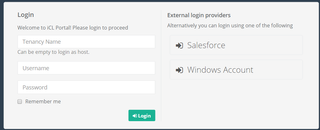
External identity providers are meant for the interactive sign-in in the browser. To access the REST API from another system, use the Client Credentials flow.
Supported grant types
The token endpoint /connect/token supports the following OAuth 2.0 grant types:
| grant_type | Use it for |
|---|---|
| client_credentials | Recommended for integrations. A service client authenticates with a client id and client secret that belong to an iCL Portal user. See Service client login. |
| password | Logging in with user name and password (Resource Owner Password Credentials flow). Deprecated — use the client credentials flow instead. |
| refresh_token | Getting a new access token without logging in again. A refresh token is only issued if the scope offline_access was requested. See Refreshing an access token. |
| authorization_code | The interactive sign-in of the iCL apps (e.g. iCL Portal, iCL Filler) via /connect/authorize. It requires a client that is registered in iCL Portal and is therefore not intended for integrations. |
All parameters are transmitted form-url-encoded in the body of the HTTP request (Content-Type: application/x-www-form-urlencoded). Remember to URL-encode the values, e.g. passwords or client secrets containing +, /, = or @.
User login using password (Resource Owner Password Credentials flow)
The password grant is deprecated. Use the Client Credentials flow for new integrations.
For a client application to authenticate a user with her password, it has to post the required authentication parameters to the /connect/token endpoint according to the OAuth 2.0 password grant.
Parameters:
| Name | Type | Required? | Description |
|---|---|---|---|
| grant_type | string | required | has to be "password". |
| username | string | required | the user name or the e-mail address of the user. |
| password | string | required | the users password in clear text. (therefore the token endpoint must not be used with unsecure http, but only https) |
| tenancyName | string | optional | the name of the tenant the user belongs to. Always provide it, unless the user is a host user. |
| client_id | string | optional | the client to request the token for. Defaults to iCLPortalApp. |
| scope | string | optional | space separated list of scopes. Add offline_access to also receive a refresh token. |
Example
POST https://dev.iclportal.com/connect/token HTTP/1.1
Host: dev.iclportal.com
Accept: application/json
Content-Type: application/x-www-form-urlencoded

grant_type=password&username=admin&password=Pass%40word%21&tenancyName=Default&scope=offline_access
If all goes well, the server responds with 200 OK and sends a JSON object containing the access_token. By default, an access token is valid for 45 minutes (expires_in is given in seconds). The refresh_token is only returned if the scope offline_access was requested.
HTTP/1.1 200 OK
Cache-Control: no-store
Pragma: no-cache
Content-Type: application/json;charset=UTF-8

{
  "access_token": "eyJhbGciOiJSU0EtT0FFUCIsImVuYyI6IkEyNTZDQkMtSFM1MTIiLCJraWQiOiI...",
  "token_type": "Bearer",
  "expires_in": 2700,
  "refresh_token": "eyJhbGciOiJSU0EtT0FFUCIsImVuYyI6IkEyNTZDQkMtSFM1MTIiLCJraWQiOiI..."
}
This access_token has to be added then to the HTTP header of each subsequent request with the header name “Authorization”, prefixed with “Bearer “:
GET https://dev.iclportal.com/api/contenttypes HTTP/1.1
Host: dev.iclportal.com
Accept: application/json
Authorization: Bearer eyJhbGciOiJSU0EtT0FFUCIsImVuYyI6IkEyNTZDQkMtSFM1MTIiLCJraWQiOiI...
If anything goes wrong (e.g. the user has provided a wrong password), the server responds with HTTP 400 bad request. A more detailed error information can be found in the JSON object in the body of the response:
HTTP/1.1 400 Bad Request
Cache-Control: no-store
Pragma: no-cache
Content-Type: application/json;charset=UTF-8

{"error":"invalid_grant","error_description":"Invalid username or email address"}
Service client login (Client Credentials flow)
For service clients, you should use the Client Credentials flow to get an access token.
For this, create a service user with the appropriate permissions that will be used to authenticate API requests.
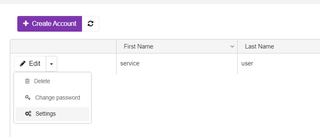
Then, go to that users settings, open the tab OAuth API tokens and click on Create new.

{
  "clientId":"fd52e53d-9b5f-405c-8084-052c8dfe08ac",
  "clientSecret":"cjfdRtrCHKYaLALOvHV/JFhSpId/gtksoSLw1XPkkAo="
}
Then, you can use these information to get an access token. The client secret is Base64 encoded and usually contains characters like /, + and =, so it must be URL-encoded in the request body:
POST https://dev.iclportal.com/connect/token HTTP/1.1
Host: dev.iclportal.com
Accept: application/json
Content-Type: application/x-www-form-urlencoded

grant_type=client_credentials&client_id=fd52e53d-9b5f-405c-8084-052c8dfe08ac&client_secret=cjfdRtrCHKYaLALOvHV%2FJFhSpId%2FgtksoSLw1XPkkAo%3D
Alternatively, you can send the client id and secret in an Authorization: Basic header instead of the request body.
If your request is successful, you will get a response like this:
HTTP/1.1 200 OK
Cache-Control: no-store
Pragma: no-cache
Content-Type: application/json;charset=UTF-8

{
  "access_token": "eyJhbGciOiJSU0EtT0FFUCIsImVuYyI6IkEyNTZDQkMtSFM1MTIiLCJraWQiOiI...",
  "token_type": "Bearer",
  "expires_in": 2700
}
The access token acts on behalf of the user the client credentials were created for, so it has exactly the permissions of that user. When it expires, simply request a new one using the client credentials.
Refreshing an access token
If you requested the scope offline_access, the token response also contains a refresh_token. Use it to get a new access token without sending the user's password again. Pass the same client_id that was used to get the original token (iCLPortalApp if you did not specify one in the password flow) and, if that client has one, its client_secret:
POST https://dev.iclportal.com/connect/token HTTP/1.1
Host: dev.iclportal.com
Accept: application/json
Content-Type: application/x-www-form-urlencoded

grant_type=refresh_token&client_id=iCLPortalApp&refresh_token=eyJhbGciOiJSU0EtT0FFUCIsImVuYyI6IkEyNTZDQkMtSFM1MTIiLCJraWQiOiI...
The response has the same format as above and contains a new access_token and a new refresh_token. Always use the most recent refresh token.
If the refresh token is no longer valid (e.g. it expired or the user was deactivated), the server responds with HTTP 400 and the error invalid_grant.